Your Shopify collaborator code is a 4-digit code that lets a Shopify Partner, agency or freelancer request access to your store. Here is where to find it, how to share it, and how to approve the request once it lands.
TLDR; want a quick roundup of this blog straight to your inbox?
Thanks for joining our newsletter.
Oops! Something went wrong while submitting the form.
What is a Shopify collaborator code?
A collaborator code is a 4-digit code tied to your store. You share it with a designer, developer, marketer or agency so they can send you a collaborator request. Only people who have the code can request access, and you still review and approve every request yourself. Collaborators don't count towards your staff limit, so bringing in a Shopify Partner won't affect your plan's user allowance.
How to find your Shopify collaborator code
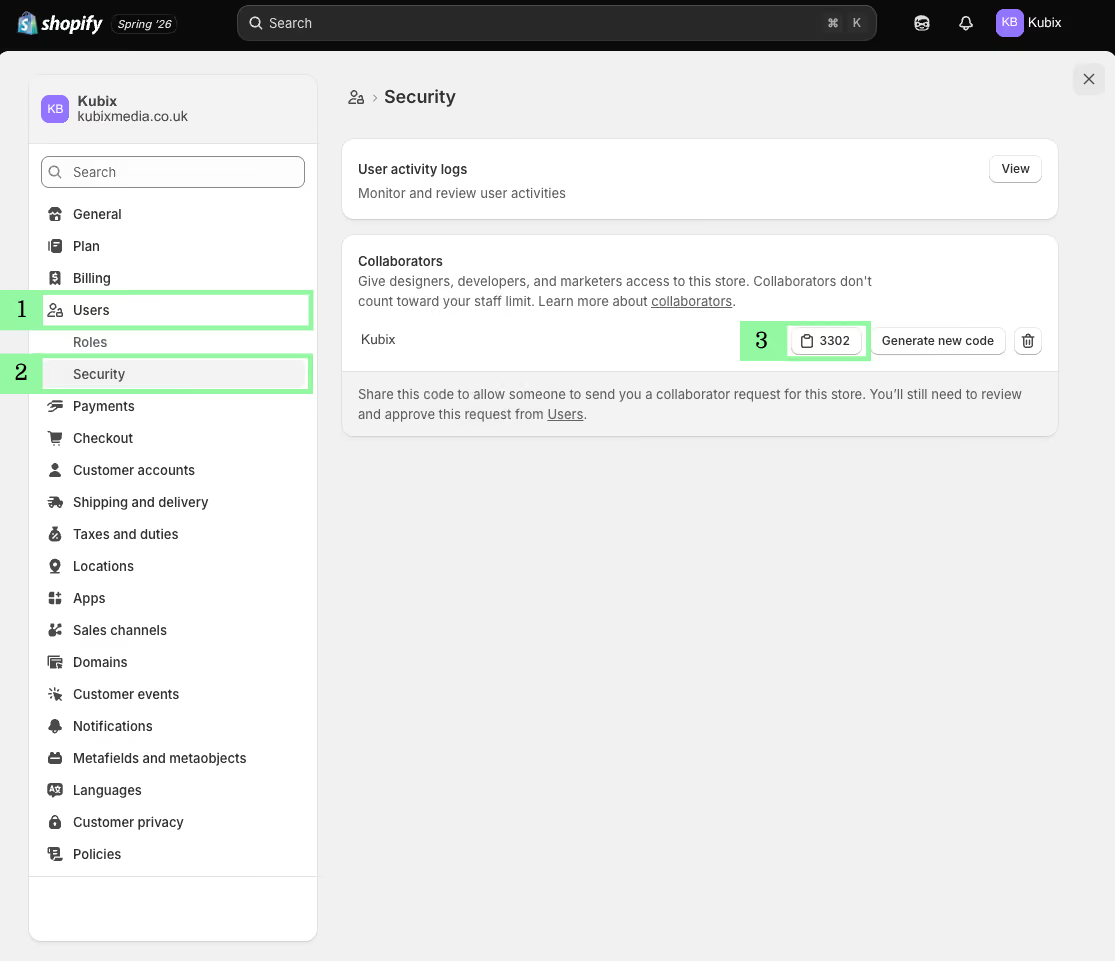
Log in to your Shopify admin and click Settings in the bottom left.
Click Users, then select Security. (If your store isn't part of an organisation, this sits under Users & permissions.)
In the Collaborators section you'll see your 4-digit code. Click it to copy it to your clipboard.
Share the code with the person or agency who needs access.
That's it. The code stays the same until you choose to change it.
Screenshot with numbered highlights showing where to find your Shopify Collaborator code within Shopify Admin.
How to approve a collaborator request
Once someone submits a request using your code, you approve it from the same area:
Go to Settings > Users.
Open the Requests tab to see any pending collaborator requests.
Click the request, review the permissions and assigned role, then click Accept request.
You'll also get an email and a Shopify Home notification whenever a new request comes in.
How to generate a new collaborator code
If you want to stop old codes from working, generate a fresh one:
Go to Settings > Users > Security.
In the Collaborators section, click Generate new code.
Any previous code stops working straight away, so only share the new one.
FAQs about Shopify Collaborator Codes.
Everything you need to know about finding, sharing and managing your Shopify collaborator code. Can't find the answer you're looking for? Please chat to our team.
What is a Shopify collaborator code?
A Shopify collaborator code is a 4-digit code tied to your store. You share it with a Shopify Partner, agency or freelancer so they can send you a collaborator request. Only people who have the code can request access, and you still review and approve every request yourself.
Where do I find my Shopify collaborator code?
Log in to your Shopify admin, click Settings in the bottom left, then go to Users and select Security. Your 4-digit code sits in the Collaborators section. If your store isn't part of an organisation, it's under Users & permissions.
Is the Shopify collaborator code always 4 digits?
Yes. Every store's collaborator code is a 4-digit number. You can click it in the Security section to copy it, then share it with your collaborator.
How do I use a Shopify collaborator code?
Share the 4-digit code with your collaborator. They enter it when submitting their collaborator request. Once they've requested access, you approve it from Settings > Users > Requests.
How do I generate a new collaborator code?
Go to Settings > Users > Security and click Generate new code in the Collaborators section. Any previous code stops working straight away, so only share the new one.
Do collaborators count towards my staff limit?
No. Collaborator accounts are separate from your regular users, so they don't use up your plan's staff allowance.
Why has my collaborator expired?
Collaborator access automatically expires after 90 days without a login. You can reactivate them from the Users page in your Shopify admin.
We use cookies to provide you with the best possible experience. They also allow us to analyse user behaviour in order to constantly improve the website for you.







.png)